
You’ve been using Asana for a while and have a firm grasp on the basics, but it’s still eating up a lot of your time and energy. Make Asana work for you, not the other way around! Customize your own workflow with these advanced features.
Create Recurring Tasks
Are you creating a new task every month for sending a status report? Keep all the info in one task that just recycles itself.
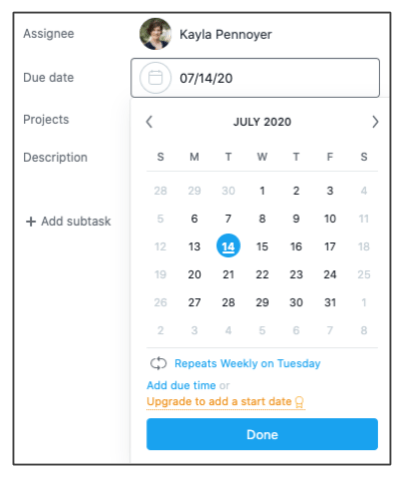
- When editing or creating a task, click the Due Date section.
- Select the due date and then click Set to Repeat (below the calendar).
- Set the time frame (daily, weekly, monthly, etc.) and frequency.
Add a Private Task
It’s possible to add a task for just yourself as a reminder, without adding it to a project. These could be reminders to check budgeted hours, ask your I.T. person for that elusive HDMI cable, or send a happy birthday note!*’
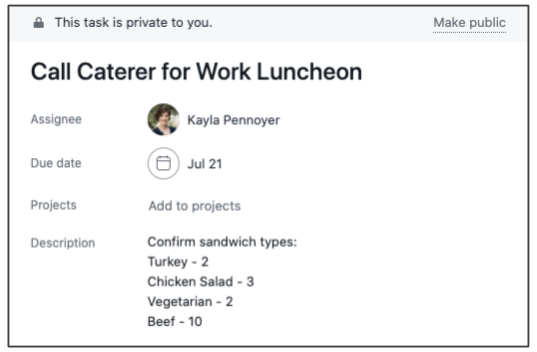
*True fact: 100% of people have 364 unbirthdays a year. Time to make some of those recurring tasks!
See Collaborator Tasks*
It’s likely your team has run into the issue of only being able to assign one person per task, and therefore assigns you as a Collaborator. However, it’s a big downside when you can’t see those items in your task list! Set up a saved search report to check on these regularly:
- Click on the Search box on the top right.
- Select Advanced Search.
- Type “Not Me” in the Assigned To field (optional but awesome).
- Type your name in the Collaborators field.
- Click the Search button.
- Click Save Report (top right) and add a report name. Now you can see this updated list any time in the Reports list in the left sidebar.

*This feature unfortunately requires a Premium account.
Make a Professional Development Project
This is one of the best things I’ve done in Asana so far. Before, my professional development goals were buried in annual review documents, my personal notebook, or emails. I converted these into my own project to keep myself on track and hold myself accountable.
Some ideas for how to use a professional development project:
- Add sections for sub-projects like Courses, Articles to Read, and Mentorship
- Use recurring due dates for ongoing efforts
- Include your supervisor as a project collaborator so they can see your progress and success prior to individual meetings
- Combine the completed tasks in this section with others you’ve worked on for a full portfolio
 KAYLA PENNOYER